




Best IPTV Apps in Europe 2026: Top 10 Reviewed and Ranked
Looking for the best IPTV app in Europe? We review and rank the top 10 IPTV players for 2026 — covering platforms, price, pros, cons, and which one is right for you.
Finding the best IPTV app for your setup can feel overwhelming. With dozens of players on the market, each promising smooth playback and a slick interface, it’s hard to know where to start. We’ve tested all the major options available to European users in 2026 — across Fire TV, Android, iOS, Smart TV, and PC — and ranked them so you don’t have to.
Whether you’re a first-time cord-cutter or an experienced user switching players, this guide gives you an honest, unbiased verdict on every serious contender.
Note: These are media player apps — software that reads your IPTV subscription’s channel list. They do not provide content themselves. You’ll need a separate, licensed IPTV subscription to use them.
Quick Comparison Table
| App | Platforms | Price | Our Rating | Best For |
|---|---|---|---|---|
| TiviMate | Android, Fire TV | Free / €4.99/yr Premium | ⭐⭐⭐⭐⭐ 9.5/10 | Overall best pick |
| IPTV Smarters Pro | Android, iOS, Fire TV, Web | Free / ~€3 one-off | ⭐⭐⭐⭐⭐ 9.0/10 | Multi-platform users |
| OTT Navigator | Android, Fire TV | Free / €3.49 Premium | ⭐⭐⭐⭐½ 8.8/10 | Power users & EPG fans |
| GSE Smart IPTV | iOS, Android, Apple TV | Free / €14.99 one-off | ⭐⭐⭐⭐½ 8.5/10 | iPhone & iPad users |
| Flix IPTV | Android, Fire TV | €3.49 one-off | ⭐⭐⭐⭐ 8.2/10 | Minimalist design lovers |
| Smart IPTV | Samsung, LG Smart TVs | €5.49 one-off | ⭐⭐⭐⭐ 8.0/10 | Smart TV users |
| Net IPTV | Samsung Smart TVs | Free / €5.49 one-off | ⭐⭐⭐⭐ 7.8/10 | Samsung Tizen users |
| Room IPTV | Samsung Smart TVs | Free | ⭐⭐⭐½ 7.5/10 | Budget Samsung users |
| Perfect Player | Android | Free | ⭐⭐⭐½ 7.2/10 | Lightweight Android use |
| Kodi | Windows, Mac, Android, iOS, Linux | Free | ⭐⭐⭐ 7.0/10 | Tech-savvy tinkerers |
1. TiviMate — Best IPTV App Overall
Platforms: Android TV, Amazon Fire TV, Google TV
Price: Free (basic) | €4.99/year for Premium
Our Rating: ⭐⭐⭐⭐⭐ 9.5/10
TiviMate has been the best IPTV app for Fire Stick and Android TV users for several years running, and 2026 has done nothing to change that. It combines a television-like interface — think broadcast EPG grid, familiar channel surfing, catch-up support — with rock-solid stability under the hood.
The free version is genuinely usable, but the Premium upgrade (less than €5 per year, and coverable by a single monthly cable saving) unlocks multi-subscription support, an archive/catch-up function, a panel for recent content, and parental controls.
✅ Pros
- Best-in-class EPG (electronic programme guide) grid layout
- Silky smooth navigation, even on budget Fire Sticks
- Supports multiple M3U and Xtream Codes playlists simultaneously
- Automatic channel updates and EPG refresh
- Active development — updates released regularly
❌ Cons
- Android TV / Fire TV only — no iOS, no Samsung Smart TV app
- Premium features require a subscription (though it’s very affordable)
- No built-in web player
Best for: Anyone with a Fire TV Stick, Nvidia Shield, or Android TV box. The undisputed go-to for most European cord-cutters.
2. IPTV Smarters Pro — Best for Multi-Platform Households
Platforms: Android, iOS, Amazon Fire TV, Windows, Mac, Web browser
Price: Free (some stores charge ~€3 as a one-off)
Our Rating: ⭐⭐⭐⭐⭐ 9.0/10
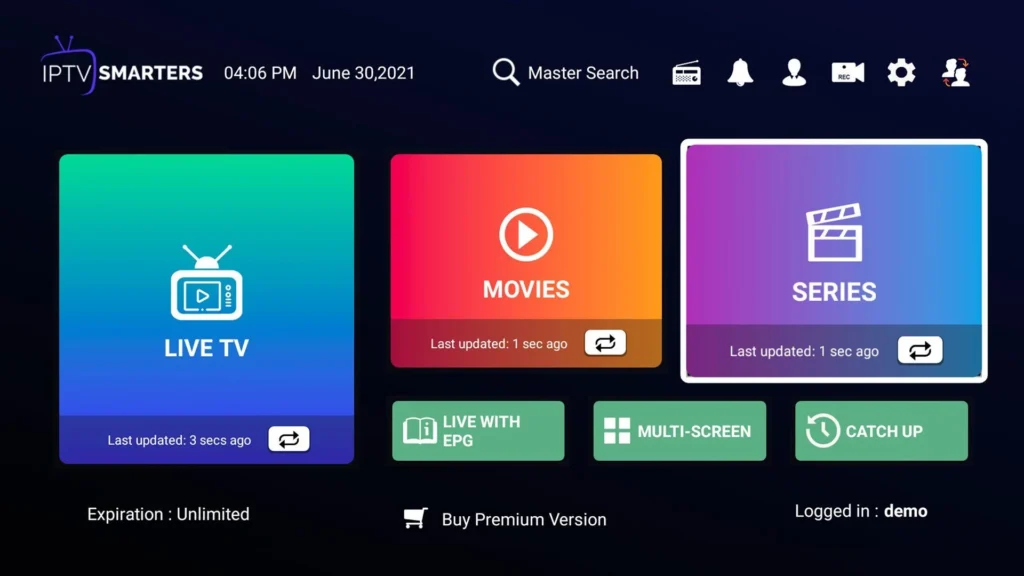
If your household uses a mix of devices — a Fire Stick in the lounge, an iPhone on the commute, and a laptop at the desk — IPTV Smarters Pro is the unifying solution. It runs on more platforms than any other app on this list and delivers a consistent experience across all of them.
The interface is clean and modern, offering separate tabs for Live TV, Movies, and Series, which makes navigating large content libraries easy even for non-technical users. Setup is quick: enter your provider’s Xtream Codes details or paste an M3U URL and you’re watching within minutes.
✅ Pros
- Widest platform support of any IPTV player
- Separate, well-organised sections for live TV, VOD, and series
- Supports Xtream Codes API for rich EPG and VOD metadata
- Clean, modern UI suitable for all ages
- Web player means no app installation needed on a laptop
❌ Cons
- Occasional buffering on lower-end Android devices
- Fewer customisation options than TiviMate
- Some forks and clones in app stores — download only from the official source
Best for: Multi-device European households, beginners, and anyone who wants one app across every screen.
3. OTT Navigator — Best for Power Users
Platforms: Android, Amazon Fire TV
Price: Free (basic) | €3.49 one-off for Premium
Our Rating: ⭐⭐⭐⭐½ 8.8/10
OTT Navigator is the choice of the IPTV enthusiast who wants full control. Its depth of customisation is extraordinary: you can fine-tune EPG sources, build custom channel groups, control buffer sizes, adjust video renderers, and set up picture-in-picture mode. For users who know what they want and how to get it, nothing else comes close.
The interface takes some learning — it’s more functional than beautiful — but once configured to your taste, it’s an incredibly capable player. EPG support is particularly strong, with the ability to load multiple external XMLTV sources.
✅ Pros
- Deepest customisation of any IPTV app
- Excellent multi-source EPG management
- Picture-in-picture support
- Active developer community with frequent updates
- Strong codec support — rarely fails to play a stream
❌ Cons
- Steeper learning curve than competitors
- Interface feels cluttered until properly configured
- Android/Fire TV only
Best for: Experienced IPTV users, those with large channel lists, and anyone who likes to configure every detail of their setup.
4. GSE Smart IPTV — Best IPTV App for iPhone and iPad
Platforms: iOS, iPadOS, Android, Apple TV, macOS
Price: Free (limited) | €14.99 one-off for full unlock
Our Rating: ⭐⭐⭐⭐½ 8.5/10
Apple device owners have historically been underserved by IPTV apps — Apple’s App Store policies are strict and many players simply aren’t available. GSE Smart IPTV fills this gap admirably. It’s polished, reliable, and supports both M3U playlists and Xtream Codes, making it compatible with virtually every IPTV provider.
The one-off €14.99 unlock feels steep compared to TiviMate’s annual fee, but you pay once and own it permanently. The Apple TV version works particularly well on a big screen, delivering a living-room experience on par with Android alternatives.
✅ Pros
- One of the very few quality IPTV players on the App Store
- Runs natively on iPhone, iPad, Apple TV, and Mac
- Supports M3U, Xtream Codes, and external EPG (XMLTV)
- Clean, iOS-native design
- Regular App Store updates (important for iOS compatibility)
❌ Cons
- One-off price is higher than Android alternatives
- Free version has significant limitations
- Slightly slower EPG loading than TiviMate
Best for: iPhone, iPad, and Apple TV users — this is the definitive iOS IPTV player.
5. Flix IPTV — Best Minimalist IPTV App
Platforms: Android TV, Amazon Fire TV
Price: €3.49 one-off
Our Rating: ⭐⭐⭐⭐ 8.2/10
Flix IPTV takes a design-first approach. Where TiviMate and OTT Navigator pack in features, Flix keeps things clean, fast, and beautiful. The interface is inspired by modern streaming apps — large artwork, smooth animations, and intuitive navigation — making it the easiest app to hand to a non-technical family member.
Performance is excellent; it handles high-bitrate 4K streams without complaint. The EPG integration is solid, and the channel favourites system is particularly well implemented.
✅ Pros
- Most visually appealing IPTV interface available
- Fast and responsive on all tested devices
- Excellent 4K and HDR playback support
- Simple, one-off payment — no subscription required
- Great for shared family use
❌ Cons
- Fewer advanced settings than TiviMate or OTT Navigator
- Android TV / Fire TV only
- No free tier — you must pay before trying
Best for: Users who prioritise aesthetics and simplicity, and households where multiple people share the same TV.
6. Smart IPTV — Best IPTV App for Samsung and LG Smart TVs
Platforms: Samsung Smart TV (Tizen), LG Smart TV (webOS)
Price: €5.49 one-off (per TV)
Our Rating: ⭐⭐⭐⭐ 8.0/10
If your television is a Samsung or LG Smart TV and you’d rather not plug in an external device, Smart IPTV is the solution. It installs directly onto your TV and reads your M3U playlist from a URL or USB drive. The result is a native, no-extra-hardware IPTV experience on your existing screen.
The interface is basic by modern standards — it hasn’t had a major visual refresh in a while — but it is stable, regularly updated for new TV firmware versions, and widely supported by IPTV providers.
✅ Pros
- No external device needed — runs on the TV itself
- Compatible with a huge number of Samsung and LG models
- Reliable and mature — years of real-world testing
- Simple M3U playlist setup
- One-off payment, permanent licence per TV
❌ Cons
- Dated interface compared to TiviMate or Flix
- One licence required per TV (can add up in multi-TV homes)
- EPG features less advanced than dedicated Android players
Best for: Samsung or LG Smart TV owners who want IPTV without buying additional hardware.
7. Net IPTV — Best Free Option for Samsung TVs
Platforms: Samsung Smart TV (Tizen)
Price: Free (with ads) | €5.49 one-off to remove ads
Our Rating: ⭐⭐⭐⭐ 7.8/10
Net IPTV is the closest Samsung-native alternative to Smart IPTV and has built a loyal following among European users thanks to its free tier. The ad-supported free version is fully functional — you can load your M3U playlist and watch live TV at no cost. The one-off payment removes the ads and unlocks a few additional features.
Setup is straightforward: install from the Samsung app store, enter your playlist URL in the settings portal on a phone or PC, and channels appear on your TV within seconds.
✅ Pros
- Genuinely usable for free
- Clean interface optimised for Samsung Tizen OS
- Fast channel loading and switching
- Easy web-based playlist configuration
❌ Cons
- Samsung Tizen only — no LG support
- Free tier includes ads
- EPG support less comprehensive than premium alternatives
- Limited codec support compared to Android-based players
Best for: Samsung Smart TV users who want to trial IPTV before committing to a paid app.
8. Room IPTV — Best Budget Samsung App
Platforms: Samsung Smart TV (Tizen)
Price: Free
Our Rating: ⭐⭐⭐½ 7.5/10
Room IPTV is the completely free option for Samsung users. There are no ads, no premium tier, and no payment of any kind — just install, add your playlist, and watch. It’s not the most feature-rich player on this list, but for users on a tight budget or those trying IPTV for the first time, it does the job without costing a penny.
✅ Pros
- Completely free with no ads
- Easy setup process
- Reliable for basic live TV viewing
❌ Cons
- Limited EPG functionality
- Interface feels unpolished
- Infrequent updates
- Samsung only
Best for: Samsung Smart TV users who want a zero-cost IPTV player for occasional use.
9. Perfect Player — Best Lightweight Android Option
Platforms: Android (phone, tablet, Android TV)
Price: Free
Our Rating: ⭐⭐⭐½ 7.2/10
Perfect Player is a veteran of the IPTV scene — it predates most of the apps on this list and still has a devoted user base. Its appeal is simplicity and low resource usage: it runs smoothly on older Android devices and phones that would struggle with TiviMate or IPTV Smarters Pro.
The interface is functional rather than beautiful — a classic channel list with a traditional EPG overlay — and it supports both M3U and XSPF playlists. If your Android box is a few years old and struggling with newer apps, Perfect Player is a worthy fallback.
✅ Pros
- Extremely lightweight — runs on older devices
- Completely free
- Stable and well-tested over many years
- Decent EPG support
❌ Cons
- Interface is visually outdated
- Less actively developed than TiviMate or OTT Navigator
- Fewer features than modern alternatives
Best for: Users with older Android devices, or those who prefer a traditional, no-frills channel-list interface.
10. Kodi — Best for Tech-Savvy Tinkerers
Platforms: Windows, macOS, Linux, Android, iOS (jailbreak), Raspberry Pi
Price: Free
Our Rating: ⭐⭐⭐ 7.0/10
Kodi is not strictly an IPTV app — it’s a full open-source media centre that can become an IPTV player through add-ons, primarily the PVR IPTV Simple Client. Once configured, it offers impressive functionality: an EPG grid, recording support (if your provider allows it), and integration with the rest of your media library.
The catch is the setup complexity. Getting Kodi working smoothly with an IPTV subscription requires time, patience, and a degree of technical comfort. For users willing to invest that time, the result is arguably the most powerful home media setup available.
✅ Pros
- Completely free and open-source
- Integrates IPTV with local media (films, music, photos)
- Available on the widest range of platforms including Windows and Mac
- Highly extensible through add-ons
- Active global community and extensive documentation
❌ Cons
- Complex initial setup — not beginner-friendly
- Requires configuration of add-ons, EPG sources, and skin
- UI can feel dated compared to purpose-built IPTV apps
- Occasional compatibility issues after updates
Best for: Technical users, home media enthusiasts, and anyone who wants IPTV integrated into a broader media centre setup.
Which IPTV App Is Best for You?
With ten strong options, the right choice depends entirely on your device and priorities. Use this decision guide:
🔥 “I have a Fire TV Stick or Android TV box.”
→ Start with TiviMate. It’s the gold standard for a reason. If you want more customisation as you grow into IPTV, add OTT Navigator later.
📱 “I mostly watch on my iPhone or iPad.”
→ GSE Smart IPTV is your best — and essentially only — serious option. The one-off cost is worth it for the reliability and App Store longevity.
📺 “I have a Samsung or LG Smart TV and don’t want extra hardware.”
→ Samsung users: try Net IPTV (free) first, then upgrade to Smart IPTV if you want a more polished experience. LG users: Smart IPTV is the go-to.
👨👩👧 “My family is sharing one TV and simplicity matters.”
→ Flix IPTV or IPTV Smarters Pro — both offer clean, accessible interfaces that non-technical users find intuitive.
💻 “I want IPTV on my Windows PC or Mac as well as my TV.”
→ IPTV Smarters Pro (web player or desktop app) or Kodi (if you’re technically minded).
⚙️ “I’m an experienced user who wants maximum control.”
→ OTT Navigator — nothing else offers the same depth of configuration.
💰 “I want something completely free.”
→ Perfect Player (Android), Room IPTV (Samsung), or Kodi (all platforms). For Samsung users wanting free with no ads, Room IPTV wins.
Frequently Asked Questions
1. Are these IPTV apps legal in Europe?
Yes — every app on this list is a legitimate media player. They are legal to download and use in all EU member states. Legality depends on the content you access through them, not the app itself. Always use a licensed IPTV subscription.
2. Do I need to pay for both an IPTV app and a subscription?
In most cases, yes — they are separate products. However, many of the apps on this list have free tiers (TiviMate, Net IPTV, Perfect Player, Kodi, Room IPTV), meaning your only cost could be the subscription itself.
3. Which IPTV app has the best EPG (programme guide)?
TiviMate consistently delivers the best EPG experience for Android/Fire TV users, with a smooth, traditional TV-style grid. OTT Navigator offers more EPG source flexibility for advanced users. For Smart TVs, Smart IPTV is the most reliable.
4. Can I use more than one IPTV app at the same time?
Absolutely. Many users install TiviMate as their primary player and keep IPTV Smarters Pro as a backup on the same device. There’s no restriction on having multiple apps installed, and each maintains its own settings independently.
5. Which app is best for 4K HDR streams?
Flix IPTV and TiviMate (using the ExoPlayer engine) handle 4K HDR streams most reliably on Fire TV and Android devices. For native 4K on a Smart TV without an external box, the TV’s built-in processing handles decoding, so Smart IPTV or Net IPTV can deliver 4K provided your subscription offers 4K streams.
Final Verdict
For most European users in 2026, the recommendation is clear:
- Fire TV / Android TV → TiviMate (Premium is worth every cent)
- iPhone / iPad / Apple TV → GSE Smart IPTV
- Samsung Smart TV → Smart IPTV or Net IPTV
- LG Smart TV → Smart IPTV
- Multi-device household → IPTV Smarters Pro
- Power users → OTT Navigator
The good news: most of these apps cost less than a single cinema ticket, and several are entirely free. There’s no reason not to try a couple and find the one that fits your setup best.
Published: May 2026 | Tested on: Amazon Fire TV Stick 4K, Samsung QN90B, iPhone 15, Nvidia Shield TV Pro, Windows 11